
How Autobound Works-v1
A guide on how to use Autobound for Chrome. Install the extension, start writing an email, and click to copy/inject A+ sales content.
Article Content
AI-powered sales platform increases email reply rate by generating individually personalized sales emails using AI. Anyone using Google Chrome can get started in less than 30 seconds (you can download our extension download the Autobound Chrome extension).
Our AI scans through millions of prospect insights, then incorporates the most relevant into a compelling, persona-specific message.
How to get started
Getting up and running is as simple as navigating to autobound.ai and plugging in your work email. Confirm your LinkedIn profile URL, add the Autobound chrome extension, and you’re ready to go!
How it works
By instantly researching the recipient in the “To:” field in your drafted email (or the prospect's LinkedIn page), Autobound scours millions of data sources from across the web, then aggregates insights unique to both your email recipient and their employer.
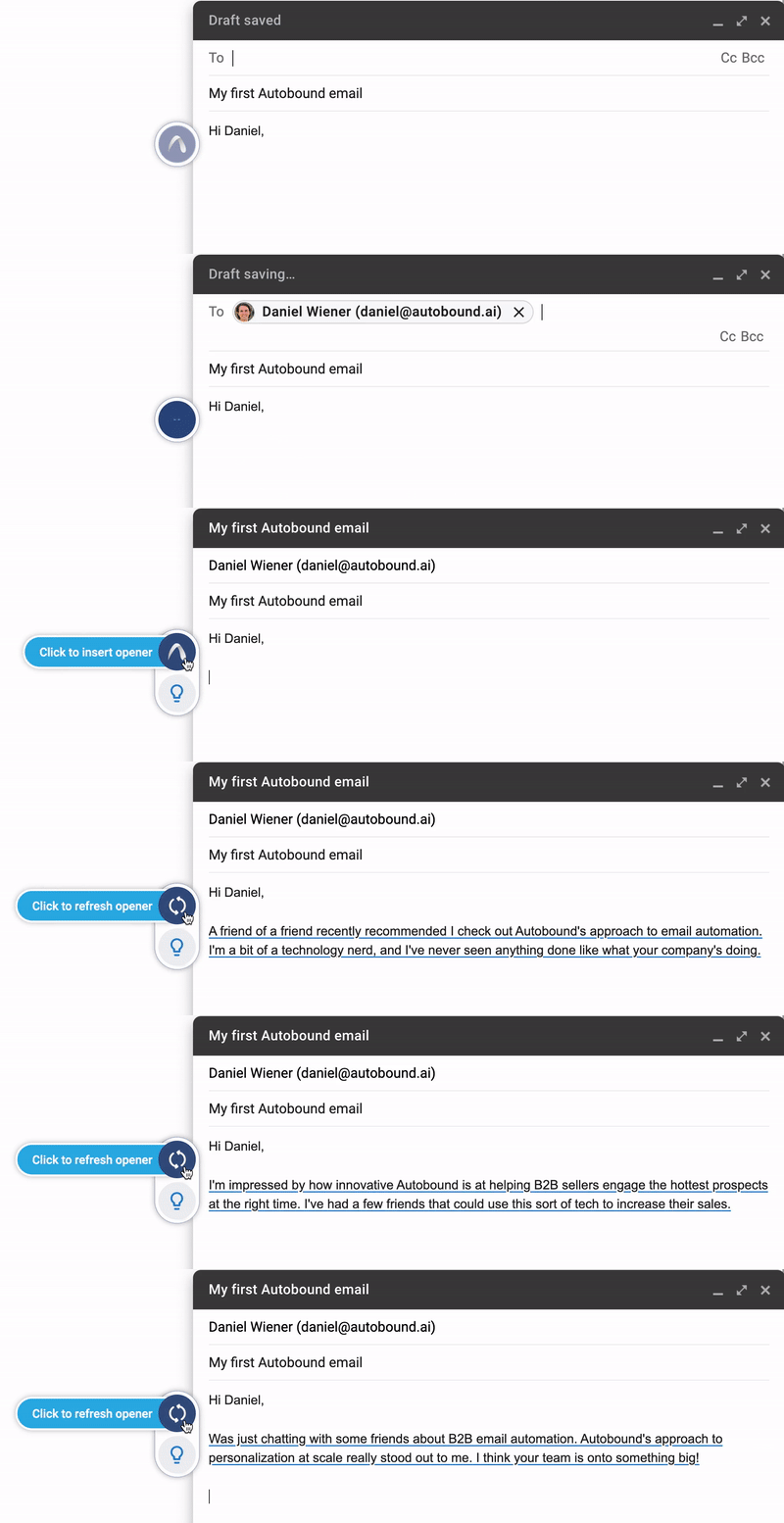
We’ve trained our AI on millions of high performing sales emails to identify what works best.
With a single click, Autobound generates a list of emails and email openers, that are proven to spark conversations.
Where our data comes from
The data that trains our AI is sourced from Linkedin, news sources from across the web, and 3rd party data vendors. Millions of data points are aggregated from hard to find places across the internet and brought right to your fingertips to place in your outbounding tool.
Signal Data API
Turn these insights into pipeline
700+ real-time buying signals from 35+ sources. Know exactly when prospects are ready to buy.
Where it works
We have native integrations with Gmail, LinkedIn, Outreach, and Salesloft. However Autobound works in over 30+ sales tools, including Salesforce, CRM and sales tool integrations, Groove & others (via our Chrome extension).
Gmail, Outreach and Salesloft functionality
- Autobound starts working when you enter a recipient’s email address into the “to” field of an email. With 1 click, you can view Autobound’s suggested emails and email openers.
What drives our personalization
Autobound’s “listening engine” combs through the digital footprint of your email recipient, their employer, and industry to surface the most relevant and personalized insights. The engine’s findings are then combined with user-inputted data (such as your persona or competitor specific messaging) to generate personalized emails and email openers.
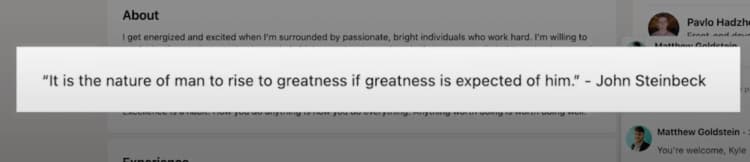
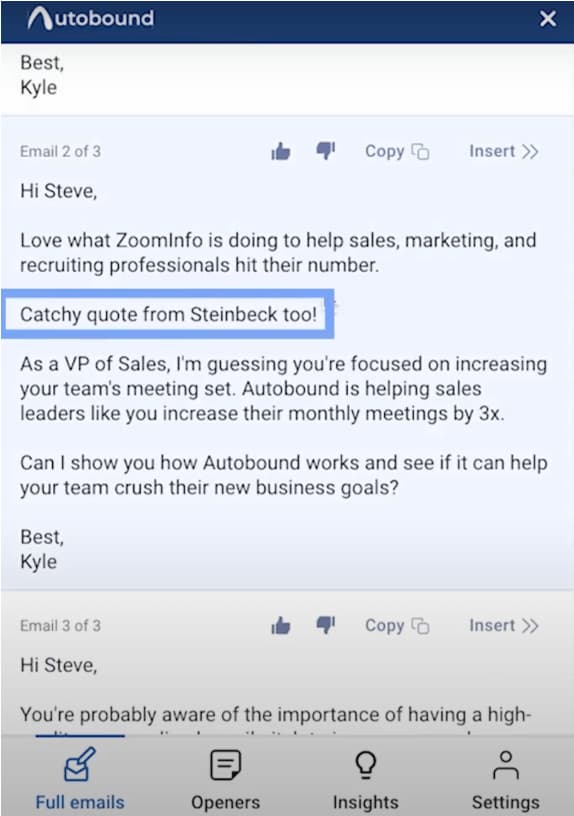
Here, our engine found a John Steinbeck quote on a prospect’s Linkedin page and personalized a full email with the information!
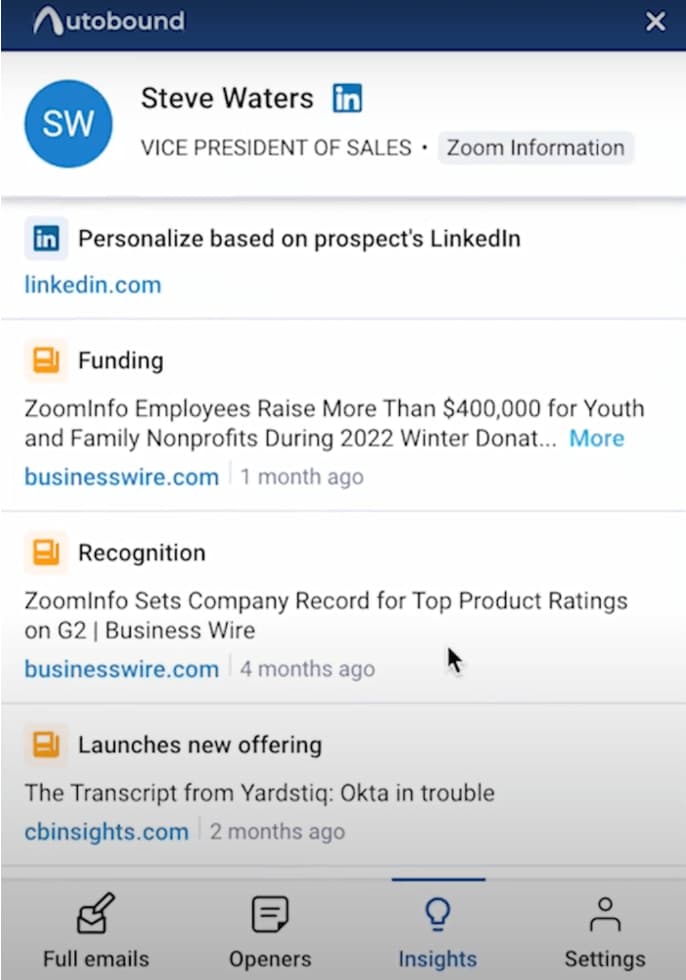
What to expect within the “Insights” panel
Individual Insights: initiatives in current role, interests and hobbies, job changes, work anniversaries, schools attended, promotions, & more. We’ll also identify experiences they share with you, such as if you both worked at the same company, live in the same city, etc.
Company Insights: funding rounds, acquisitions, press releases, company initiatives, names of customers/investors, product launches, competitive technologies used, and more.
Signal Data API
Turn these insights into pipeline
700+ real-time buying signals from 35+ sources. Know exactly when prospects are ready to buy.
Becoming an Autobound Pro
To ensure your content is as engaging and personalized as possible, customize your Autobound settings and see your conversions skyrocket!
Editing your company description
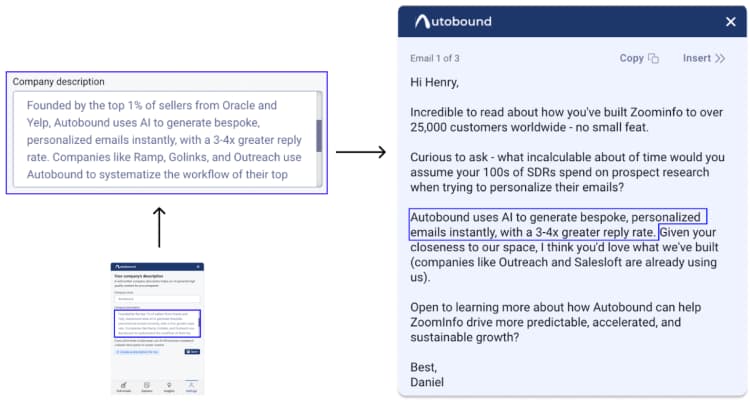
The first step to getting the most out of Autobound is updating your company’s description. This gives our AI the most important and relevant information for generating compelling emails. The sequence to edit your description is: settings>company description>enter your company’s description.
Here, we strongly recommend following the prompt within the product:
Describe the problems you solve (in detail), how you solve them (be short) and the benefits your customers receive.
Spending time to nail your company’s value proposition ensures our AI is writing the most powerful emails possible for you.
Related: AI sales tools guide.
Related: cold email templates guide.
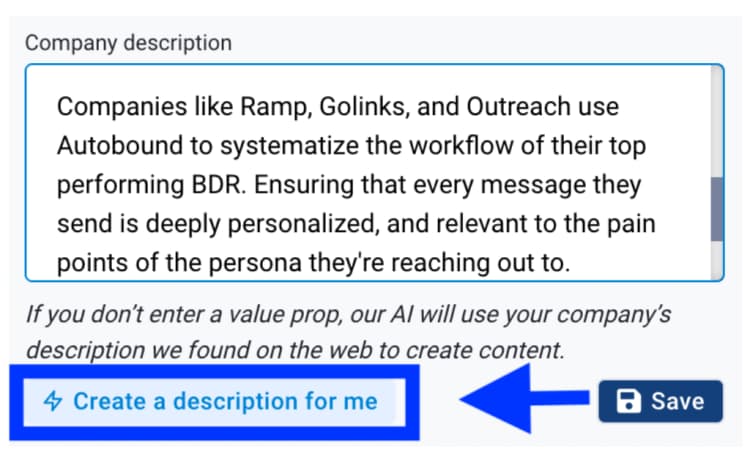
If you have writer’s block, you can simply click “create a description for me” and our AI will generate a few options from which to choose. We suggest enhancing it before saving to really touch it up. Without a company description, our AI will continue to write emails using data sourced from your LinkedIn page.
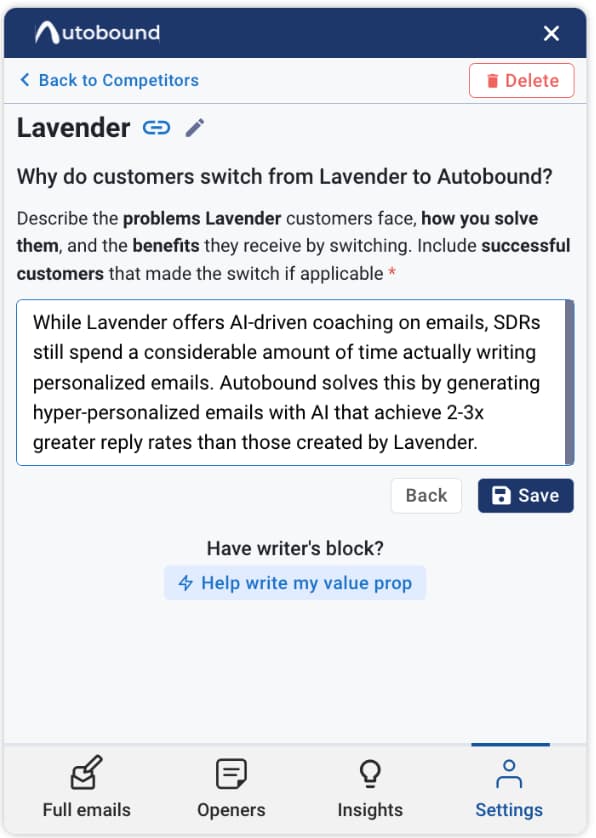
Adding competitors to create associated messaging
A great way to customize your sales pitch is recognizing which competitor your potential customer is currently using. This can impact your value proposition and what you would like to highlight in your pitch.
Autobound gets this data from third party vendors. We know which products certain companies use by...
- Looking at their cookies and site data
- Using machine learning to identify customer logos on company's "customer" pages
- Press releases, and more
Autobound allows you to customize your messaging based on competitors in a few easy steps: click settings>competitors>add competitor. Now, add your competitor’s company url and a description of your competitor-specific messaging.
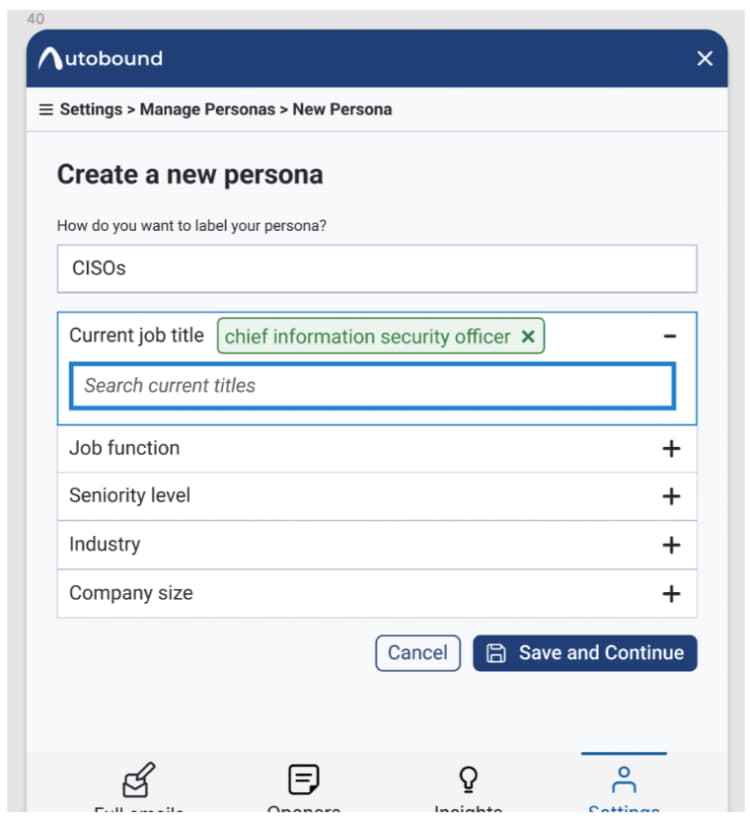
Adding personas to create associated messaging
Personas allow you to customize your messaging based on the type of customer you’re reaching out to. Personas are vital for categorizing your outreach and using proper tone for your messaging.
Autobound allows you to quickly change messaging based on personas you have pre-loaded into Autobound. The sequence to make these changes is: settings>personas>add persona.
Be sure to NOT MAKE YOUR FILTERS TOO RESTRICTIVE here. This is quite different from the flow you might be used to on LinkedIn sales navigator. Here, you're just trying to bucket a prospect that you're reaching out to into the correct persona that you've built in settings. We recommend keeping the filters very non-restrictive (don't use too many).
Questions? Reach out to support@autobound.ai.
Related Signals
See live buying signals related to this topic — updated in real-time from 35+ data sources.
Job Changes
The #1 buying trigger — new roles mean new vendor evaluations
Explore signal →
Hiring Signals
Growing teams signal budget and urgency to buy
Explore signal →
Funding Rounds
Recently funded companies are actively purchasing
Explore signal →
700+ signal types across 35+ categories
Browse all signals →Related Articles
Intent Without the Black Box: We Backtested a Signal-Native Buying Predictor
We backtested a signal-native intent engine on 82.8M signals and real outcomes. It flagged future software buyers at up to 7.6x the accuracy of random targeting.
What's New at Autobound Signal API — June 2026
Self-serve credits, unlimited intent exports, company scoring, better errors, and faster performance. Here's what's new at Autobound Signal API.
Top Buying Signal Platforms for B2B Teams in 2026
Compare the top buying signal platforms for B2B sales teams in 2026. See how platforms like 6sense, ZoomInfo, Demandbase, and Autobound stack up on cove...
Explore Signal Data
35+ data sources. 250M+ contacts. 50M+ companies. Talk to our team about signal data for your use case.