

AI-Personalized Email Sequences, Sent Natively from Gmail
AI Studio treats Gmail as a first-class sending channel. Build multi-step email sequences powered by 700+ buyer signals, configure follow-up delays and thread behavior, then send at scale with Autopilot or review each email in Copilot mode. The Chrome extension still works alongside for ad-hoc personalization -- both share the same Content Hub.
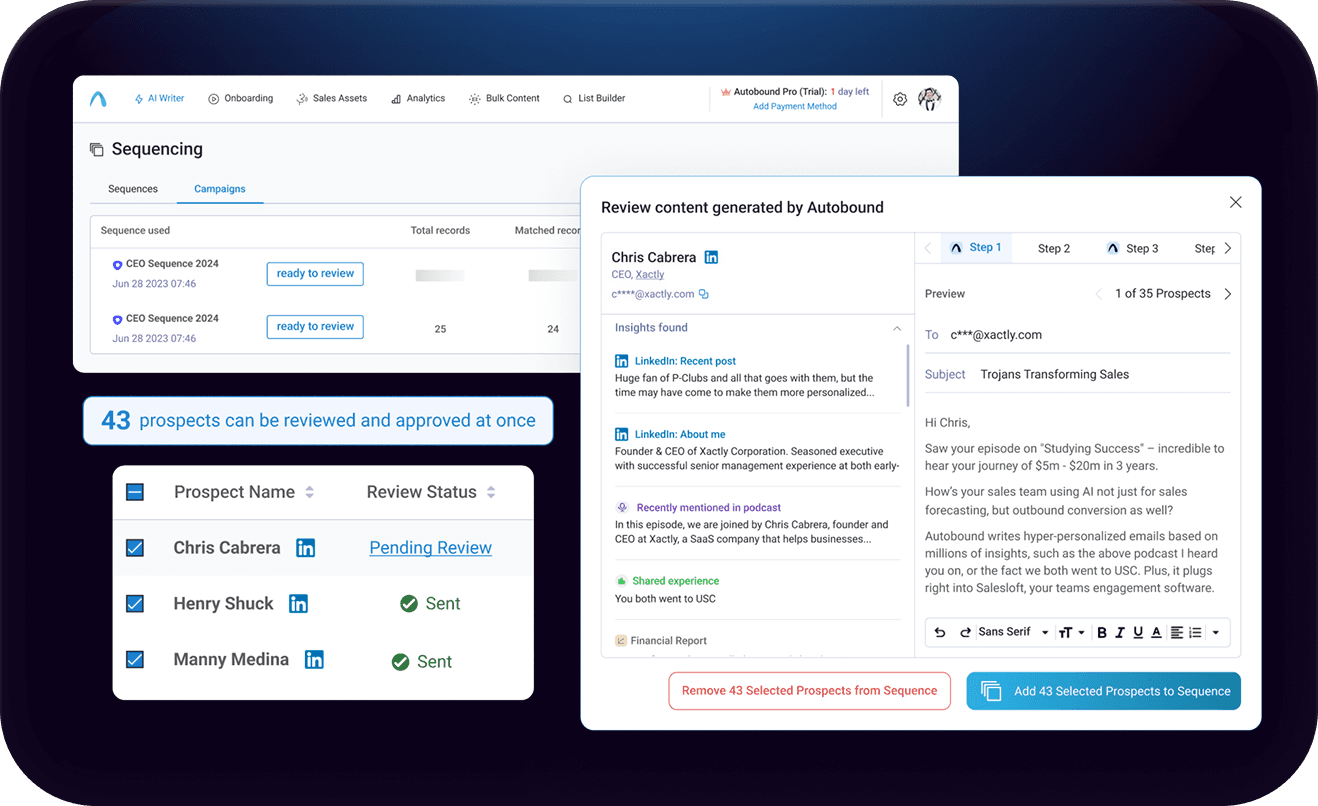
Build and Send AI-Personalized Email Sequences Natively Through Gmail
Build multi-step AI-personalized sequences that send directly from Gmail. Autopilot for scale, Copilot for control, Chrome extension for ad-hoc.
Key capabilities
What Autobound + Gmail unlocks for your team.
Native Multi-Step Sequencing
Build email sequences with multiple follow-up steps and configurable delays directly through Gmail. Each step sends from your actual inbox with your signature and domain reputation intact -- no third-party sending infrastructure required.
New Thread vs Reply Threading
Control how each follow-up appears in the prospect's inbox. Configure individual steps to start a New Thread (separate conversation) or send as a Reply that continues the existing email thread for a more natural conversational flow.
Autopilot and Copilot Modes
Autopilot fires every sequence step automatically on schedule for hands-off scale. Copilot pauses each email for your review before sending, showing the buyer signals and reasoning behind the draft so you can approve, edit, or regenerate with confidence.
BCC Logging to HubSpot and Salesforce
Every email sent through Gmail is automatically BCC-logged to your CRM. Sent emails appear on the correct contact record in HubSpot or Salesforce without manual data entry, giving managers full pipeline visibility while reps stay in Gmail.
Chrome Extension for Ad-Hoc Personalization
Use the Autobound Chrome extension inside Gmail for one-off emails, quick replies, and opening line generation. It shares the same Content Hub as AI Studio, so your value propositions, writing styles, and brand guidelines stay consistent across both surfaces.
Content Hub Brand Voice Consistency
Define your value propositions, sales assets, writing styles, persona-specific guidelines, and messaging frameworks in Content Hub once. Every email generated through AI Studio or the Chrome extension automatically reflects your approved brand voice and strategic positioning.
How it works
Get up and running with Gmail in 4 simple steps.
Connect Gmail and Configure Sending
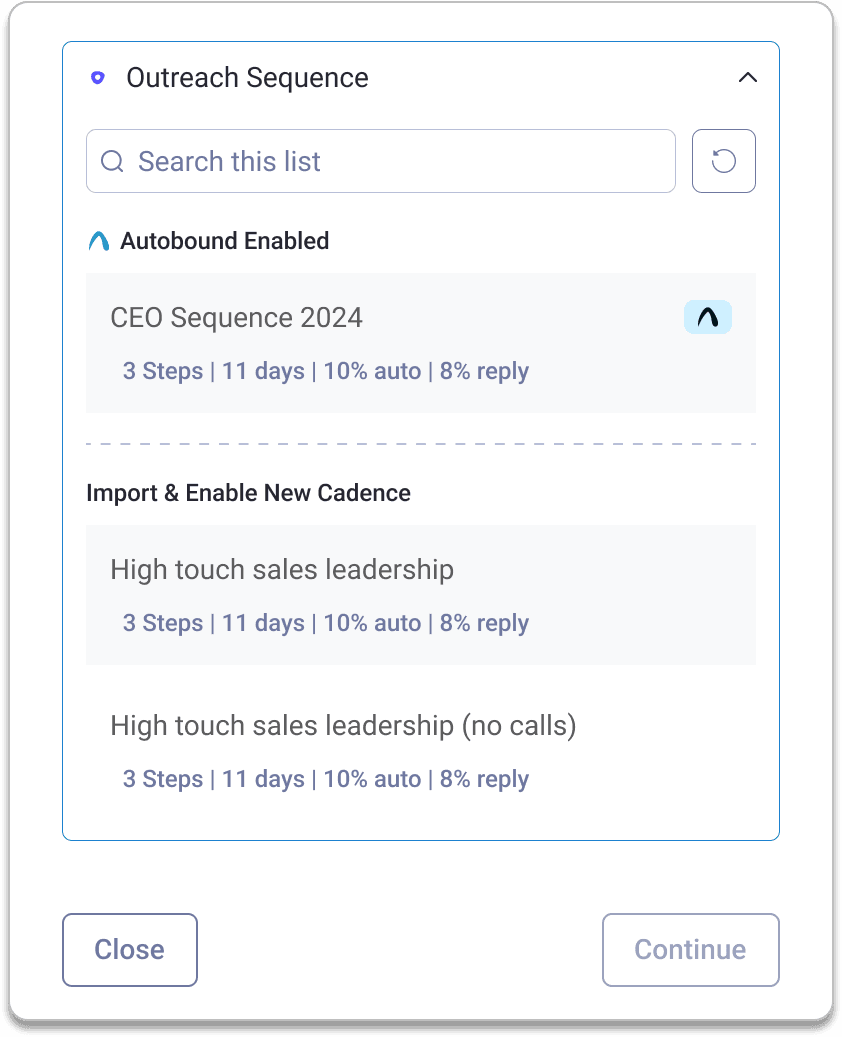
Connect your Gmail account to AI Studio via OAuth in one click. Your email signature imports automatically, and you can configure BCC logging to HubSpot or Salesforce so every send is captured in your CRM. Choose your sender mode: Fixed Account sends all campaign emails from one connected Gmail, while Logged-in User mode lets each rep send from their own inbox for multi-seller campaigns. Set up unsubscribe link preferences and sender display settings -- all before writing a single email.
Generate AI-Personalized Sequences
AI Studio analyzes 700+ real-time buyer signals -- company funding, leadership changes, tech stack, hiring trends, competitive moves, and more -- to generate email content that is unique to every recipient. Your Content Hub ensures every message reflects your value props, writing style, and persona-specific messaging frameworks. No templates. No generic copy.
Configure Multi-Step Delivery
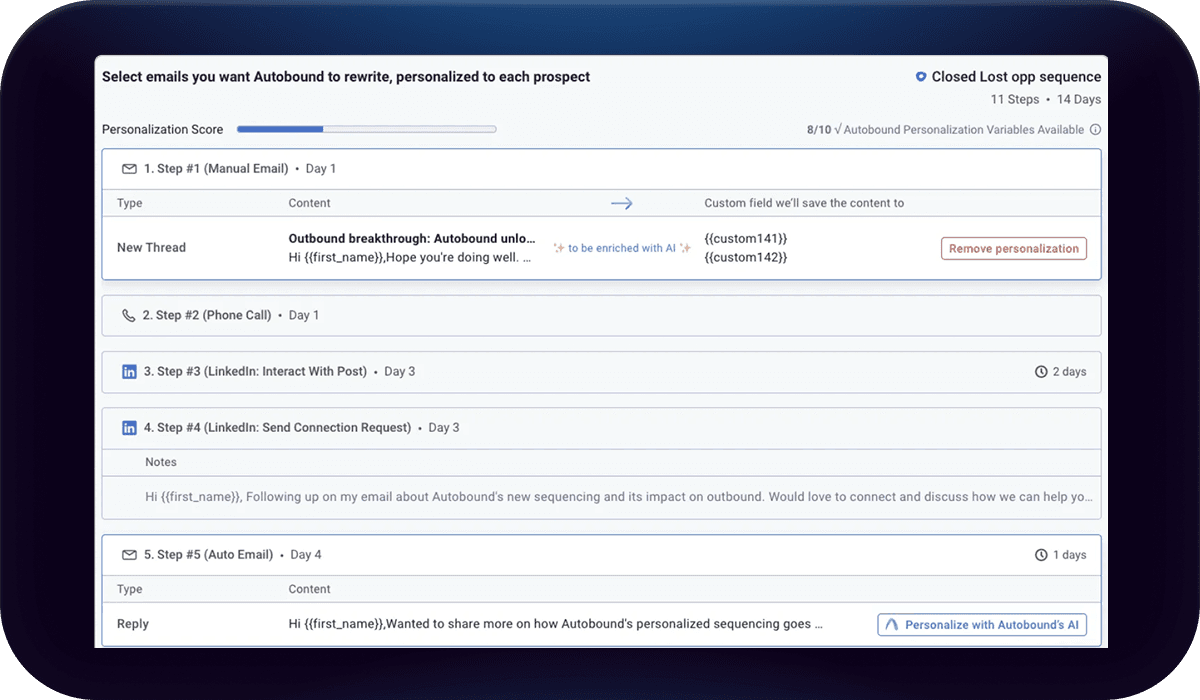
Add follow-up steps and set precise send delays between each one (e.g., "2 days after previous email"). Choose whether each follow-up sends as a New Thread or a Reply that continues the existing conversation. Use Run Conditions to control step execution -- skip a step if the prospect's domain matches a filter, if they have already replied, or any other criteria you define.
Send with Autopilot or Copilot
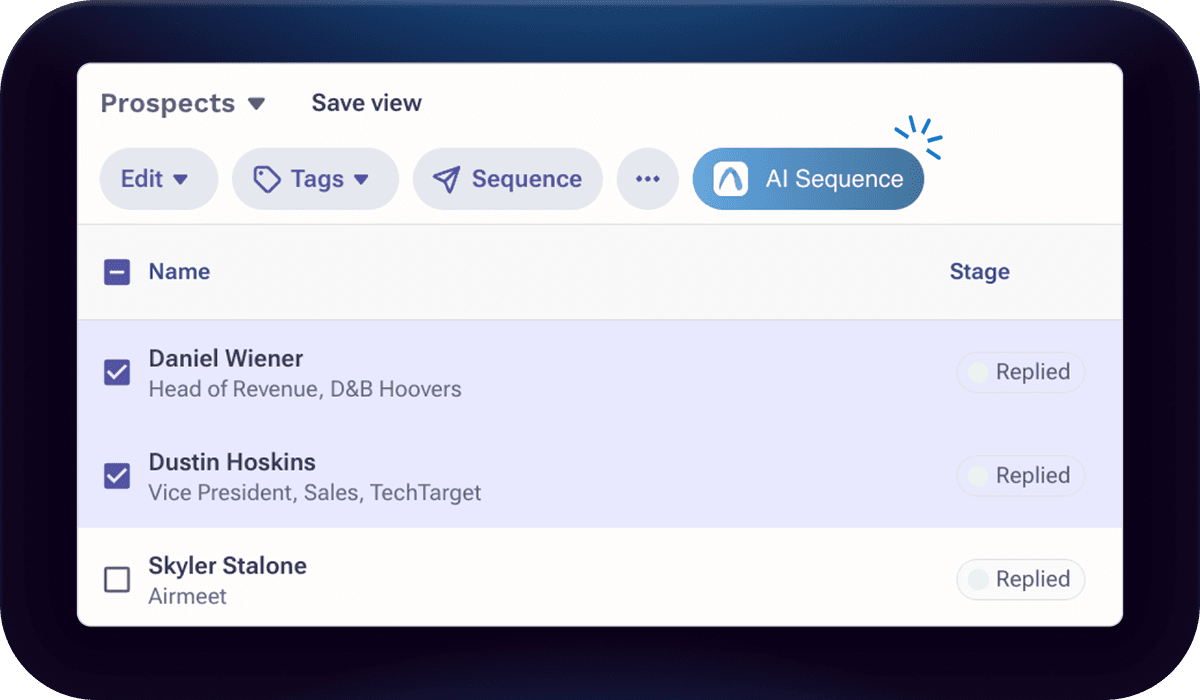
Choose how you send. In Autopilot mode, AI Studio fires each sequence step automatically on schedule -- fully hands-off at scale. In Copilot mode, every email pauses for your review before sending, so you keep full control over what goes out.
The Chrome extension still works alongside AI Studio for ad-hoc Gmail personalization. Both share the same Content Hub, so your value props, writing styles, and brand guidelines stay consistent whether you are running a 5,000-contact Autopilot campaign or writing a single cold email from compose.
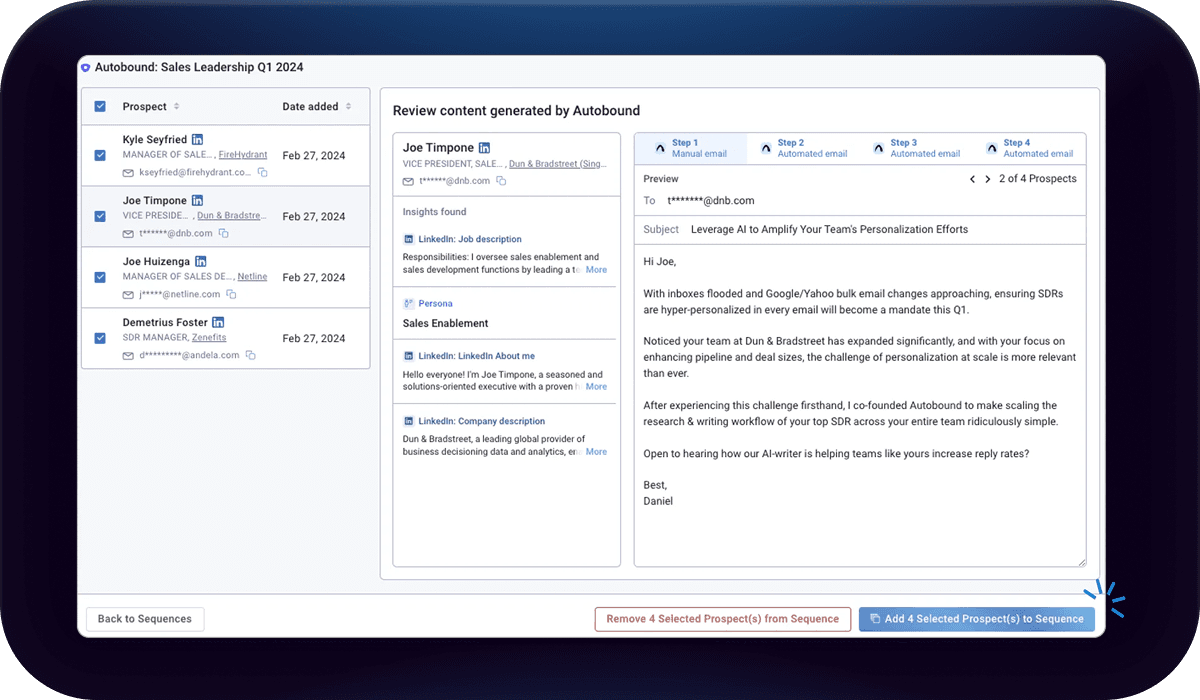
Gmail as a First-Class Sending Channel in AI Studio
Autobound AI Studio treats Gmail as a native sending channel, not an afterthought. Connect your Gmail account via OAuth, and AI Studio can build and execute multi-step email sequences that send directly from your inbox -- with your signature, your domain reputation, and your personal touch fully intact.
The columnar workflow in AI Studio makes building Gmail sequences intuitive. Add a "Send with Gmail" column to any campaign, map your email fields (subject, body, recipient), then layer on follow-up columns with precise delays between each one. Each step can be configured as a New Thread (starting a separate conversation) or a Reply (continuing the existing thread), giving you full control over how your sequence appears in the prospect's inbox. Run Conditions let you skip steps based on criteria you define -- for example, suppressing a follow-up if the prospect's email contains gmail.com or if they already replied.
AI Studio supports two sender modes for Gmail. In Fixed Account mode, all emails in a campaign send from a single connected Gmail account -- ideal for centralized outreach or when one SDR owns an entire list. In Logged-in User mode, each rep sends from their own connected Gmail, so multi-seller campaigns route emails through the correct personal inbox automatically. Both modes preserve the sender's signature and domain reputation.
Real-time status tracking shows exactly where every prospect stands: Waiting, Running, Success, or Error. No guesswork, no black-box delivery. Combine this with 700+ buyer signals powering every email, and you get enterprise-grade personalized sequencing delivered through the most trusted email client in the world.
Chrome Extension and AI Studio: Better Together
The Autobound Chrome extension and AI Studio are complementary tools that share the same Content Hub -- your value propositions, sales assets, writing styles, and persona-specific guidelines all stay in sync across both surfaces.
Use the Chrome extension for ad-hoc personalization when you are already inside Gmail: composing a quick reply, writing a one-off cold email, or generating an opening line for an existing template. Use AI Studio when you need to build, schedule, and automate multi-step sequences at scale. The extension handles the spontaneous; AI Studio handles the systematic. Together, they ensure that every touchpoint your team sends through Gmail -- whether manual or automated -- is deeply personalized and on-brand.
BCC Logging for Full CRM Visibility
Every email sent through Gmail via AI Studio can be automatically BCC-logged to your CRM. Whether your team runs on HubSpot or Salesforce, each message is captured against the correct contact record without any manual data entry. Reps stay in Gmail, managers see activity in the CRM, and nothing falls through the cracks.
This means your pipeline reporting reflects actual outreach activity in real time. When a sequence is running on Autopilot, every step that fires is logged automatically. When a rep uses Copilot mode to review and approve individual emails before sending, those sends are logged too. The result is a complete, auditable record of every prospect interaction -- built passively, without adding a single step to your team's workflow.
Run AI-powered sequences directly in Gmail
Create multi-touch email sequences where every step is personalized with 700+ insights -- all native in Gmail. No third-party sequencing platform required.
Every step personalized
Not just the first email -- every follow-up is uniquely generated using real-time signals like funding, hiring, news, and social activity.
Review and approve
AI drafts every message, but you maintain control. Review, edit, and approve before sending -- ensuring brand safety at scale.
Scale without sacrifice
Run sequences to hundreds or thousands of prospects with the same quality you would give to one.
Frequently asked questions
Does Autobound send emails from my actual Gmail inbox?
How does CRM logging work with the Gmail integration?
What is the difference between Autopilot and Copilot mode?
Can I use both the Chrome Extension and AI Studio with Gmail?
What Autobound plan do I need for the Gmail integration?
Other integrations
Autobound works across your entire sales stack.
.svg)
Outlook
First-class Outlook sequencing in AI Studio. Build multi-step, AI-personalized campaigns that send directly from your Outlook inbox at enterprise scale.

Generate AI-personalized InMails and connection requests from any LinkedIn profile with the Chrome Extension, or create bulk LinkedIn content at scale with AI Studio. Autobound generates the content -- you send it.

Salesloft
Generate AI-personalized cadence content in AI Studio, then deliver it to Salesloft via CSV export -- with native Salesloft integration coming soon.
Use Cases
See how teams use Autobound
From autopiloted SDRs to enterprise copilots -- explore real workflows.
Platform
Explore the platform
Signal Engine, Insights Engine, Content Hub -- see the full product.
Success Stories
Real results from real teams
See how companies are driving replies, meetings, and revenue.
Related Articles
Nobody Lies to r/sysadmin: Reddit Is Now a B2B Signal Source
Autobound now mines 550+ hand-vetted business communities for 15 types of B2B signal: buying intent, pricing revolts,...
Patents are a buying signal. We rebuilt ours from the string up.
A relaunched patent signal feed: four subtypes, an entity-resolution engine that turns raw assignee strings and inven...
What's New at Autobound Signal API: Fall 2026
Real, typed buying signals from 12,000 podcast episodes a day and 5,400 conference agendas a year, with the executive...

Explore signal data
35+ data sources. 250M+ contacts. Custom configurations for your use case.