

Use n8n's HTTP Request nodes to call Autobound's API and build any outbound workflow you can expect.
n8n's visual workflow builder connects to Autobound through standard HTTP requests and webhooks, giving you full control over how prospects flow in and AI-personalized content flows out -- no dedicated node required.
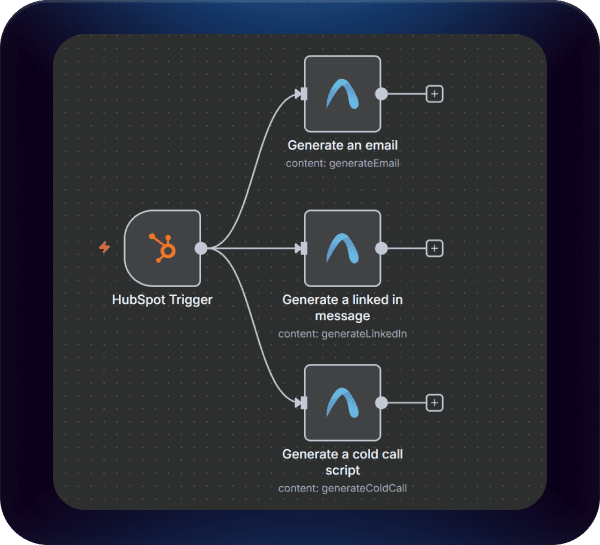
Build API-Powered AI Outreach Workflows Through n8n
Connect n8n to Autobound's API to automate hyper-personalized outreach at scale, delivering unique, multi-channel messages to every prospect through any workflow you design.
Key capabilities
What Autobound + n8n unlocks for your team.
API-Powered Integration
Connect to Autobound using n8n's HTTP Request node and standard REST API calls. No dedicated node required -- you get full access to Autobound's API capabilities including campaign execution, content generation, and webhook exports.
Any Trigger Node as Input
Use any of n8n's 1,000+ trigger nodes to feed prospects into Autobound workflows. Fire from CRM record changes, Google Sheets updates, incoming webhooks, scheduled cron jobs, Slack commands, or any other event source.
HTTP Request Node for Autobound API
Send prospect data to Autobound's campaign execution endpoint (POST /api/workflows/campaigns/{campaignId}/execute/) and receive AI-personalized emails, LinkedIn messages, and call scripts generated from 700+ buyer signals.
Webhook Response Handling
Receive generated content synchronously in the API response or asynchronously via webhook. Use n8n's Webhook node to capture finished content for bulk workflows where processing takes longer.
Human-in-the-Loop via Slack or Sheets
Route AI-generated content to a Slack channel for quick approval or a Google Sheet for batch review before sending. Use n8n's Wait node or secondary triggers to pause workflows until a team member signs off.
No-Code Visual Workflow Builder
Design complex outbound automation visually in n8n's canvas. Chain Autobound API calls with CRM updates, conditional logic, data transformations, and multi-step approval flows -- all without writing code.
How it works
Get up and running with n8n in 4 simple steps.
Design Your Workflow
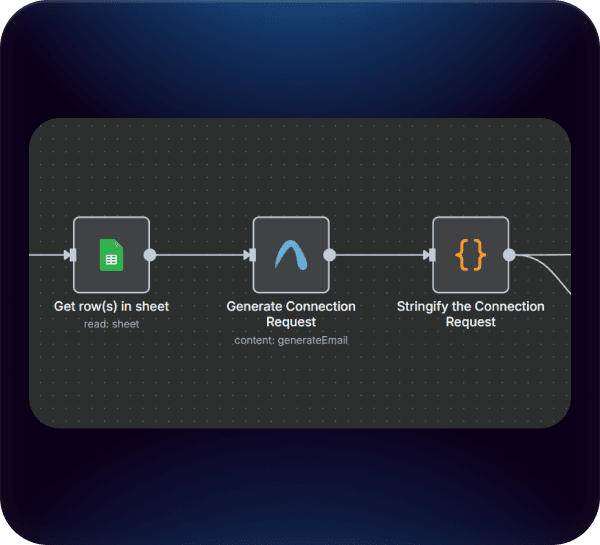
n8n's no-code workflow builder gives you complete flexibility to design outbound automation around Autobound's API. Add an HTTP Request node pointed at Autobound's campaign execution endpoint (POST /api/workflows/campaigns/{campaignId}/execute/), configure your authentication headers, and pass prospect data as the request body. Start with a simple trigger-to-generate flow or build a multi-step process that chains Autobound API calls with CRM updates, Slack notifications, and conditional logic.
Personalize Every Message
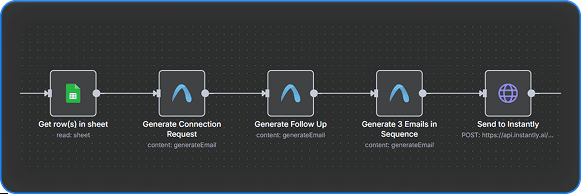
Configure your HTTP Request node to send prospect details -- email, LinkedIn URL, name, and company -- to Autobound's API. Autobound researches each contact against 700+ real-time buyer signals and returns fully written, personalized emails, LinkedIn messages, or call scripts. You control whether you generate a single opening email or an entire multi-touch sequence, all by adjusting the parameters in your API request.
Trigger from Any Source
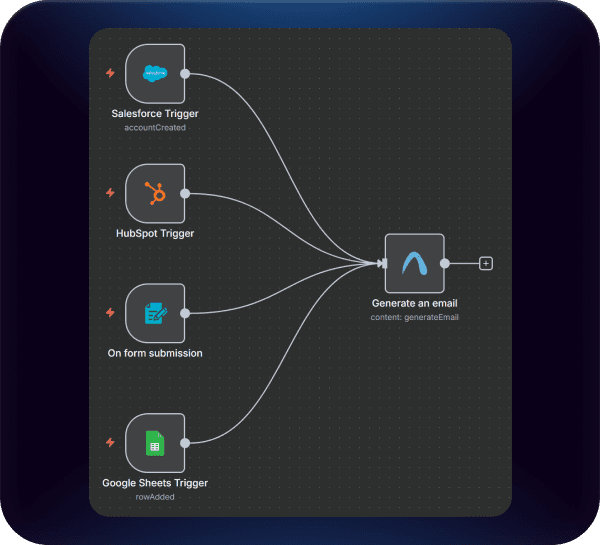
Because n8n connects to virtually any tool, you can trigger Autobound API calls from any source in your GTM stack. Fire workflows from Salesforce or HubSpot record changes, Google Sheets row additions, incoming webhooks, scheduled cron jobs, or Slack slash commands. There is no need for manual CSV uploads -- your outreach pipeline updates automatically based on the events and data sources you already rely on.
Review and Send with Confidence
Autobound's API returns the generated content and the specific buyer signals used to create it, giving you full transparency. For maximum scale, pipe the API response directly into your sending tool. For added oversight, build a human-in-the-loop step into your n8n workflow -- route content to a Google Sheet for batch review, send it to a Slack channel for quick approval, or use n8n's Wait node to pause until a manager signs off. You choose the level of control that fits your team's process.
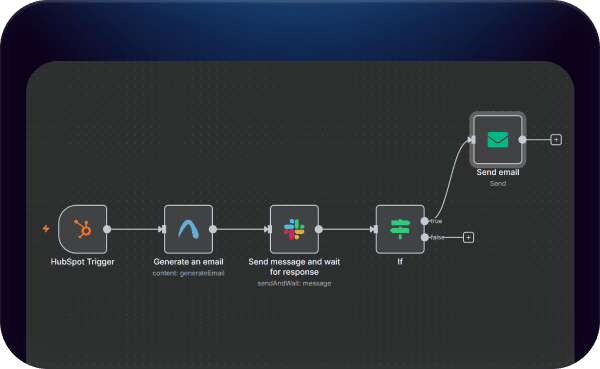
How n8n Connects to Autobound (API + Webhooks)
There is no dedicated Autobound node in n8n's node library. Instead, the integration uses n8n's built-in HTTP Request node to call Autobound's REST API -- the same API infrastructure that powers integrations with Clay, custom scripts, and any other tool that speaks HTTP. This approach gives you more flexibility than a pre-built node would, because you have full control over request parameters, headers, and response handling.
The core workflow pattern is straightforward:
Trigger: Any n8n trigger node starts the workflow. This could be a Webhook node receiving data from your CRM, a Schedule node running every hour, a Google Sheets trigger watching for new rows, or a Salesforce trigger firing on record updates. n8n supports over 1,000 integrations, so virtually any event in your GTM stack can kick off the workflow.
Enrich and Send: An HTTP Request node sends prospect data to Autobound's API endpoint (POST /api/workflows/campaigns/{campaignId}/execute/). The request body includes the prospect's email or LinkedIn URL as the required identifier, plus optional fields like name, company name, and domain for richer personalization. Autobound processes the request using 700+ real-time buyer signals and returns AI-generated content.
Handle the Response: Autobound can return content synchronously in the API response or asynchronously via webhook. For webhook-based flows, configure a separate Webhook node in n8n to receive the finished content when Autobound completes generation. This is especially useful for bulk workflows where processing takes longer.
Route and Act: Once you have the generated content, n8n's branching logic lets you do anything with it. Push it to your CRM via API, send it through an email tool, post it to Slack for review, append it to a spreadsheet, or feed it into another workflow. The output is standard JSON, so it works with any downstream node.
Why API-Powered Integration Beats a Pre-Built Node
Pre-built nodes are convenient for simple use cases, but they lock you into the node author's assumptions about how the integration should work. With Autobound's API approach, you get access to the full range of Autobound functionality -- campaign execution, content generation, signal retrieval, and webhook exports -- without waiting for a node maintainer to add features.
You also get version control. When Autobound adds new API parameters or capabilities, you can adopt them immediately by updating your HTTP Request node configuration. There is no dependency on a third-party node package release cycle.
For teams already comfortable with n8n's HTTP Request node (which is one of the most commonly used nodes on the platform), the setup is familiar. You configure the URL, method, headers, and body just like any other API call.
Common Workflow Patterns
CRM-Triggered Outreach: A Salesforce or HubSpot trigger fires when a new lead is created or a deal stage changes. The workflow sends the contact to Autobound's API, receives personalized content, and pushes it back to the CRM as a custom field or directly into a sequence tool like Outreach or Salesloft.
Spreadsheet-Based Campaigns: A Google Sheets trigger watches for new rows added by your marketing or SDR team. Each new row triggers an API call to Autobound, and the generated content is written back to adjacent columns for review before sending.
Scheduled Batch Processing: A Schedule node runs nightly, pulling a list of prospects from your database or CRM, sending each one to Autobound's API, and storing the results for next-day outreach.
Webhook-to-Webhook Pipeline: An external system (like a form submission tool or lead scoring platform) fires a webhook to n8n. The workflow enriches the lead with Autobound content and forwards the complete package to your sales engagement platform via another API call.
Human-in-the-Loop Review: After Autobound generates content, the workflow posts it to a Slack channel or Google Sheet. A team member reviews and approves the content, and a second workflow (triggered by a Slack reaction or sheet checkbox) sends the approved messages through your outreach tool.
Frequently asked questions
Is there a native Autobound node in n8n?
No. There is no dedicated Autobound node in n8n's node library. Instead, you connect to Autobound using n8n's built-in HTTP Request node, which calls Autobound's REST API directly. This approach gives you more flexibility than a pre-built node because you have full control over request parameters, headers, and response handling -- and you can adopt new Autobound API features immediately without waiting for a node package update.
What API endpoints do I use to connect n8n to Autobound?
The primary endpoint is POST /api/workflows/campaigns/{campaignId}/execute/, which triggers content generation for a prospect. You send the prospect's email or LinkedIn URL (required) plus optional fields like name, company name, and domain. Autobound returns AI-generated content either synchronously in the response body or asynchronously via webhook to a URL you configure. For webhook-based flows, set up a separate Webhook node in n8n to receive the finished content.
Can I trigger Autobound workflows from any data source?
Yes. Because n8n supports over 1,000 integrations, you can trigger Autobound API calls from virtually any source: Salesforce or HubSpot record changes, Google Sheets row additions, incoming webhooks from lead scoring tools, scheduled cron jobs for batch processing, or even Slack slash commands. Any event that can start an n8n workflow can feed prospects into Autobound.
How do I handle the content Autobound returns?
Autobound's API returns generated content as standard JSON, along with the specific buyer signals used to create it. In n8n, you can route this output anywhere: push it to your CRM via API, send it through an email or sequence tool, post it to Slack for review, append it to a Google Sheet, or feed it into another workflow. For human-in-the-loop review, route content to Slack or Sheets and use a secondary trigger (like a Slack reaction or checkbox) to approve and send.
Which Autobound plans support API access for n8n workflows?
Autobound's API is available on all plans. Any team with an Autobound account can generate an API key and connect n8n via HTTP Request nodes. The API uses the same credit system as the web app -- each content generation consumes credits based on the content type and sequence length you request.
Other integrations
Autobound works across your entire sales stack.

Clay
Instantly enrich your Clay lists with 700+ real-time insights and generate hyper-personalized outreach content at scale.

Generate AI-personalized InMails and connection requests from any LinkedIn profile with the Chrome Extension, or create bulk LinkedIn content at scale with AI Studio. Autobound generates the content -- you send it.

Gmail
Build multi-step AI-personalized sequences that send directly from Gmail. Autopilot for scale, Copilot for control, Chrome extension for ad-hoc.
Use Cases
See how teams use Autobound
From autopiloted SDRs to enterprise copilots -- explore real workflows.
Platform
Explore the platform
Signal Engine, Insights Engine, Content Hub -- see the full product.
Success Stories
Real results from real teams
See how companies are driving replies, meetings, and revenue.
Related Articles
Nobody Lies to r/sysadmin: Reddit Is Now a B2B Signal Source
Autobound now mines 500+ hand-vetted business communities for 15 types of B2B signal: buying intent, pricing revolts,...
Patents are a buying signal. We rebuilt ours from the string up.
A relaunched patent signal feed: four subtypes, an entity-resolution engine that turns raw assignee strings and inven...
What's New at Autobound Signal API: Fall 2026
Real, typed buying signals from 12,000 podcast episodes a day and 5,400 conference agendas a year, with the executive...

Explore signal data
35+ data sources. 250M+ contacts. Custom configurations for your use case.